Roughly55%fewer support tickets
Self-service cut the wait for custom segments.


Cordial · Audience segmentation case study
Visual audience segmentation for Cordial's marketers
Cordial's segments lived in a JSON editor that only advanced users could work in. I led design on a drag-and-drop builder any marketer could use. After launch, per Cordial data, segment creation got roughly 40% faster.
The problem
Marketers wanted more control over who got each email, SMS and in-app message. Rules and rule sets lived in an old code editor built for people fluent in JSON. Here is the same audience both ways.
BeforeWritten by hand in JSON
Only people fluent in JSON could change it.
AfterBuilt on the canvas
Any marketer can drag it together.
Custom rules needed JSON knowledge, so marketers leaned on customer support and waited for the turnaround.
New rules waited on support
There was no way to nest a saved audience inside a new one, which made advanced campaign logic harder to build.
No way to build on a saved audience
The old setup couldn't handle large queries, so segmenting big contact lists meant delays for campaigns.
Big lists meant delays
Marketers of every skill level should build and reuse audiences on their own, without retraining.
A visual canvas where you drag or click rules into place, so anyone can build a segment.
Nest a saved audience inside a new one without changing the original or relearning anything.
Large data sets shouldn't slow targeting down on email, SMS or in-app.
My role: Design lead on Audience Builder at Cordial, where my official title was Senior User Experience Designer. Over 10 to 12 months I took it from research to UI designs and prototypes, working closely with the PM, subject matter experts (SMEs) and backend developers.
The 30-second read
Segments took roughly 40% less time to build than with JSON.
Include and exclude groups, rule sets and saved audiences all live on one canvas. The code editor is still there for experts.
After launch, per Cordial data, support tickets fell by roughly 55%.
Walkthrough · 45 seconds
The pink marker shows where each rule will land as I drag.
Research
User interviews and the time customer support spent on manual work shaped the direction.
Design influence: Pointed to friendly visual aids and simple, short workflows.
Way inDrag a rule
Design influence: Shaped a mix of visual tools and code, with fixes for common errors.
Way in</> Visual and code
Design influence: Pushed for quick linking and real-time hints, without risking the platform's stability.
Way inSaved audiences
In research and exploration I looked at Mailchimp, Marketo, Braze and Iterable. They left gaps in scale and in nesting saved audiences, which Audience Builder set out to fill.
It led small-business email automation with an accessible UI, but advanced segmentation struggled with larger audiences.
A preferred choice for mid and large B2B companies with strong capabilities, but a clunky UI for non-technical users and limited real‑time nesting.
Known as a cross-channel leader, with higher costs and a steeper learning curve, and limits on nested groups and performance on big data sets.
Timely multi-channel targeting, but restrictions on nested audience groups and backend performance for larger data sets.
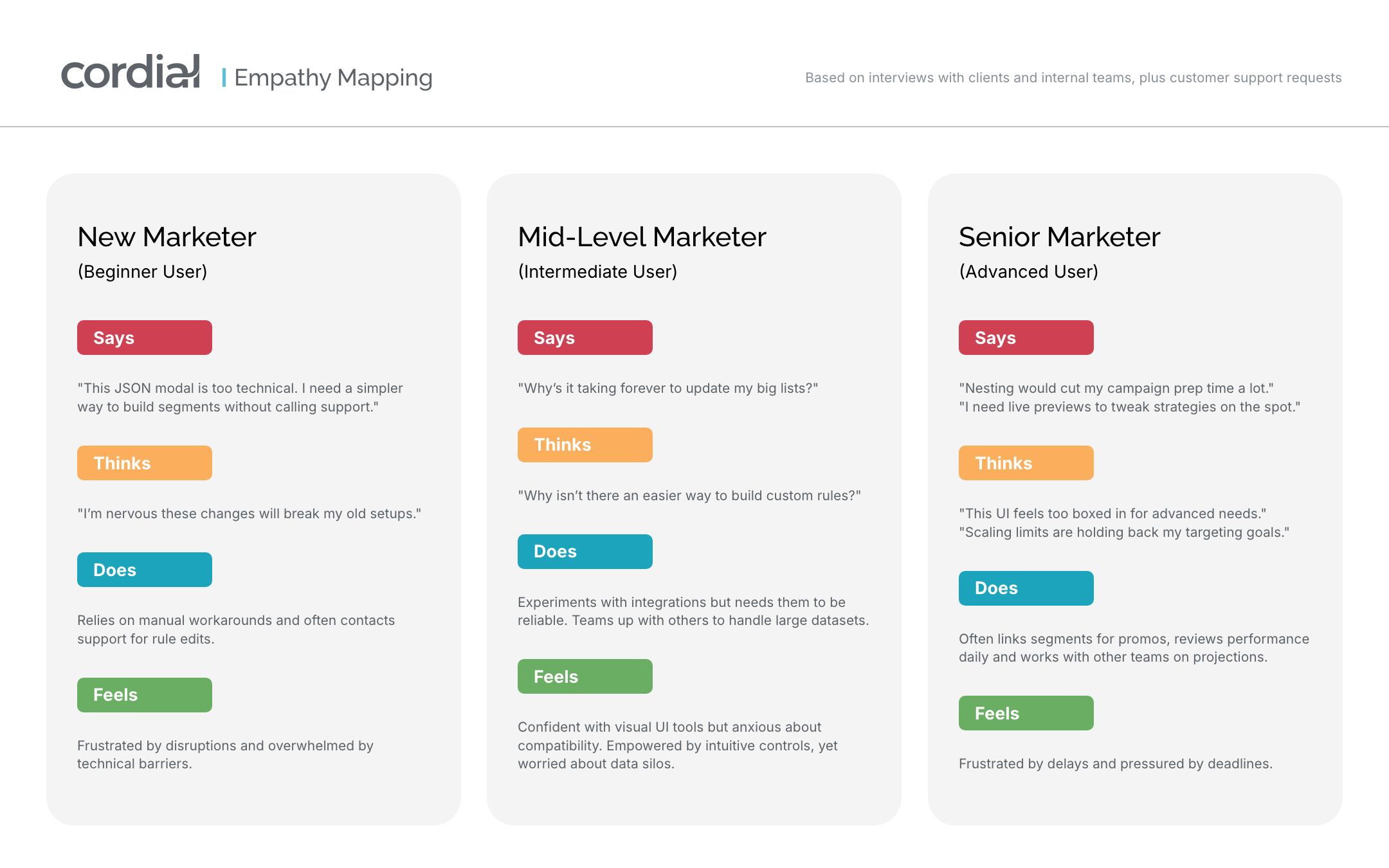
We ran an empathy map exercise to explore what each persona needed, what frustrated them and what drove them, so the design matched their real work.
Design
The canvas sits on the left and the rule picker on the right.
In early exploration we showed low-fidelity wireframes to stakeholders and clients. Their feedback on the drag-and-drop ideas shaped the high-fidelity designs.


Every rule in the picker can be dragged into Include or Exclude, or clicked to add it where the blue highlight is. While you drag, a pink marker shows exactly where it will land, and the other group shows a gray one.
Drop a rule onto another rule, or drag a Rule set in from the picker and fill it. In testing I asked people whether both ways were easy to find.
Tested inThe prototype sessions
Saved rules holds the audiences your team has already built. Drag one in to build on it. If someone edits the original, a pop-up highlights what changed and lets you use the update or keep your version.
Early studies showed some technical users wanted to keep writing JSON. Some wrote it in an outside code editor and pasted it in. We upgraded the JSON editor with real code editor features, and dropping that outside step was a big win for them. Non-technical users preferred the visual builder.
Shaped byThe Mid-Level Marketer
Under the hood
I worked on both with the five backend developers on the team.
Scaling large queries was backend work. On the design side, rules are edited right on the canvas, which cut down the modals people had to open and close.
Big lists, fewer modals
Every existing JSON audience had to open in the new builder. That was a project requirement, so people wouldn't need retraining. The code editor stayed one click away on the toolbar for anyone who preferred JSON.
Both ways stay open
Testing
I wanted to see if people could build a segment and reorder its rules on their own, and whether anything felt confusing.
Results
Opening segment building to every skill level led to a rise in audiences created and wider use across Cordial's platform. All numbers are after launch, per Cordial data from product analytics and support ticket counts.
Roughly55%fewer support tickets
Self-service cut the wait for custom segments.
Per Cordial dataSharpertargeting
One segment worked across every channel.
After launchGrewmore segments built
People praised nesting and the interactive UI.
Looking back
Sessions had 4 to 5 people, so the first numbers came after launch.
Tackling outdated components, compatibility issues and nesting together is what moved rule editing onto the canvas, with fewer modals in the way.
In retrospect, early A/B tests would have measured how the UI affected campaign speed, on top of the testing rounds and live reviews we ran.
Audience Builder · Cordial
I moved segment building out of a JSON editor and onto a canvas, so any marketer at Cordial could build and reuse an audience.